
For companies working closely with ServiceNow, partnership work quickly spreads across many places—emails, shared drives, separate training portals, scattered notes on instances, and support. It becomes harder to see what the current developments are, who is certified on which capabilities, which deals are registered, and how the partnership is actually performing.
The ServiceNow Partner Portal brings this together in one place. It gives partners a central entry point to:1
- Access resources and enablement materials
- Manage training and certifications
- Handle instance requests
- Track support tickets
- Collaborate with ServiceNow on sales and delivery
Instead of jumping between multiple systems and threads, teams log into a single portal and work off the same source of truth.
In this blog post, we look at what the ServiceNow Partner Portal offers, how it helps partners work more efficiently and confidently with ServiceNow, and where inMorphis, as an Elite ServiceNow Partner, fits in to help you use the portal more effectively in day‑to‑day work.
Advantages of the ServiceNow Partner Portal for Businesses

Using the ServiceNow Partner Portal is about having one structured place to manage key partner-related activities. It helps reduce manual work, improve visibility, and make it easier to keep pace with ServiceNow and your customers. These benefits include:
1. Streamlined Workflows
Without a central portal, partner work tends to live in emails, spreadsheets, and scattered documents. The ServiceNow Partner Portal reduces this sprawl by moving key actions into defined workflows, whether that’s enabling assets, managing instances, or handling updates related to joint work with ServiceNow.
2. Real-Time Collaboration
Partners and internal teams often need to coordinate the same information across different locations and time zones. The portal provides a shared space to view records, exchange updates, and attach relevant documents.
Instead of relying on side-channel conversations, everyone works from the same record in the portal, which reduces miscommunication and speeds up responses.
3. Automated Processes
A lot of partner-related activities are repetitive: approvals, notifications, reminders, and status changes. Within the ServiceNow Partner Portal, these steps can be automated using workflows.
Automation reduces the need for manual follow‑up, helps prevent missed steps, and lets teams spend more time on actual delivery instead of chasing routine tasks.
4. Analytics and Reporting
The portal provides dashboards and reports that help you understand how your partnership work is running in practice. Depending on your setup, you can monitor areas like training completion, instance usage, deal or opportunity tracking, and support trends.
This level of visibility makes it easier to spot bottlenecks, measure progress against targets, and decide where to focus on improvement efforts.
Implementing the ServiceNow Partner Portal for Your Business
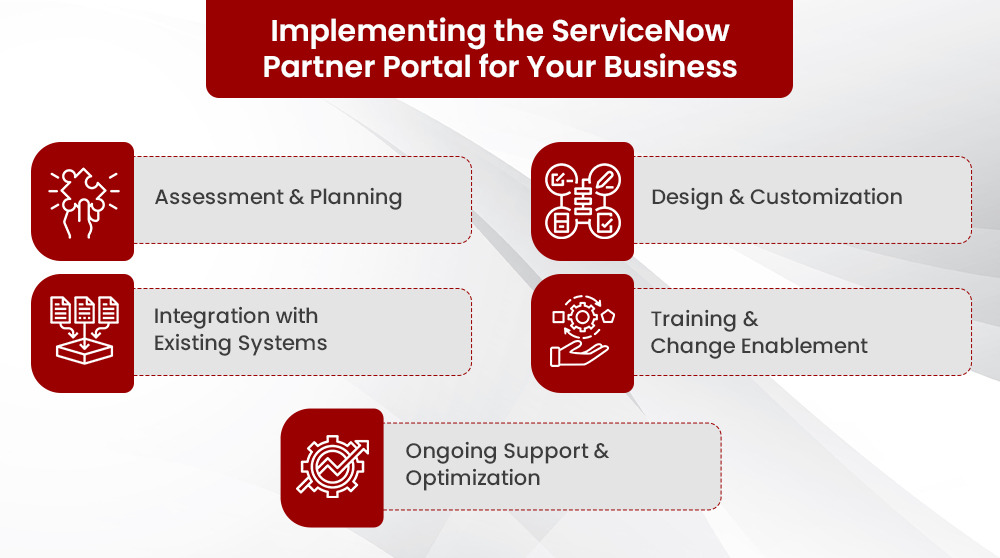
Getting value from the ServiceNow Partner Portal is not just about gaining access. It’s about setting it up to fit your processes, data, and teams, and then supporting it over time. This is where working with an experienced ServiceNow partner, like inMorphis, makes a difference.
A typical implementation approach includes the following stages:
1. Assessment and Planning
The first step is to understand how you currently work with ServiceNow and what you need from the Partner Portal. This usually involves:
- Reviewing existing processes for training, instances, support, and sales collaboration
- Identifying key users and stakeholders
- Clarifying what “success” with the portal should look like
This assessment forms the basis for how the portal will be configured and rolled out.
2. Design and Customization
Next, the portal experience is shaped to match your requirements. This can include:
- Defining roles and access levels
- Configuring workflows, forms, and fields
- Aligning navigation and layout with how your teams prefer to work
The goal is to make the portal practical and intuitive, rather than expecting users to adapt to a generic setup.
3. Integration with Existing Systems
In many cases, the ServiceNow Partner Portal works alongside other tools such as CRM, ERP, or internal reporting systems. Where appropriate, integrations can be set up to:
- Reduce duplicate data entry
- Keep records in sync
- Ensure partner-related activity is visible in the systems your teams already use
This helps the portal become part of your broader landscape rather than another silo.
4. Training and Change Enablement
Even a well-designed portal will only succeed if people know how and why to use it. Focused enablement typically covers:
- How different user groups should use the portal in their day-to-day work
- Which activities move from email or spreadsheets into the portal
- How to interpret dashboards and reports
Clear guidance and simple reference materials help drive adoption and reduce resistance to change.
5. Ongoing Support and Optimization
After go‑live, the portal will need ongoing attention as your use of ServiceNow evolves. This may include:
- Handling issues and minor enhancements
- Adjusting workflows or access as teams change
- Reviewing usage and performance, then refining where needed
For in-depth view you also read: How Can ServiceNow Partner Boost Efficiency
Enhancing Your ServiceNow Partner Portal Experience with inMorphis
The ServiceNow Partner Portal is a powerful ecosystem tool—but like any platform, its value depends on how well it aligns with your operational workflows, sales motions, and co-selling needs.
At inMorphis, we work closely with partners to help them streamline portal usage, simplify internal processes, and ensure teams get the most out of their ServiceNow relationship. Our deep experience across multiple ServiceNow products and partner motions allows us to translate real-world challenges into practical configurations and best practices that truly work for growing partner organizations.
Here’s how inMorphis adds distinct value:
- End-to-end ServiceNow Expertise
Support across advisory, implementation, customization, integrations, upgrades, and ongoing support not only for the Partner Portal, but for the broader ServiceNow landscape you rely on.
- Alignment With Real-world Processes
Focus on configuring the portal to reflect how your teams actually work today, and how you want them to work in the future. This reduces friction and supports adoption.
- Attention to Adoption and Outcomes
Emphasis on training, documentation, and simple ways of working, so the portal does not become “just another tool” but a place people go to get things done.
Bringing It All Together
The ServiceNow Partner Portal gives partners a single, structured place to work with ServiceNow by providing access to resources, managing instances, tracking training and certifications, collaborating on sales, and monitoring performance. When set up and used well, it reduces manual effort, improves visibility, and makes it easier to keep pace with both ServiceNow and your own customers.
As an Elite ServiceNow Partner, inMorphis helps you maximize your ServiceNow-enabled digital transformation with complete visibility on the partner portal.
Explore inMorphis's ServiceNow Services or contact us for a consultation to discuss your specific digital transformation needs.
